
Although Evo Voice doesn't directly support server-controlled SIP Intercom functionality, a similar feature can be achieved using common SIP handset features.
Configuration:
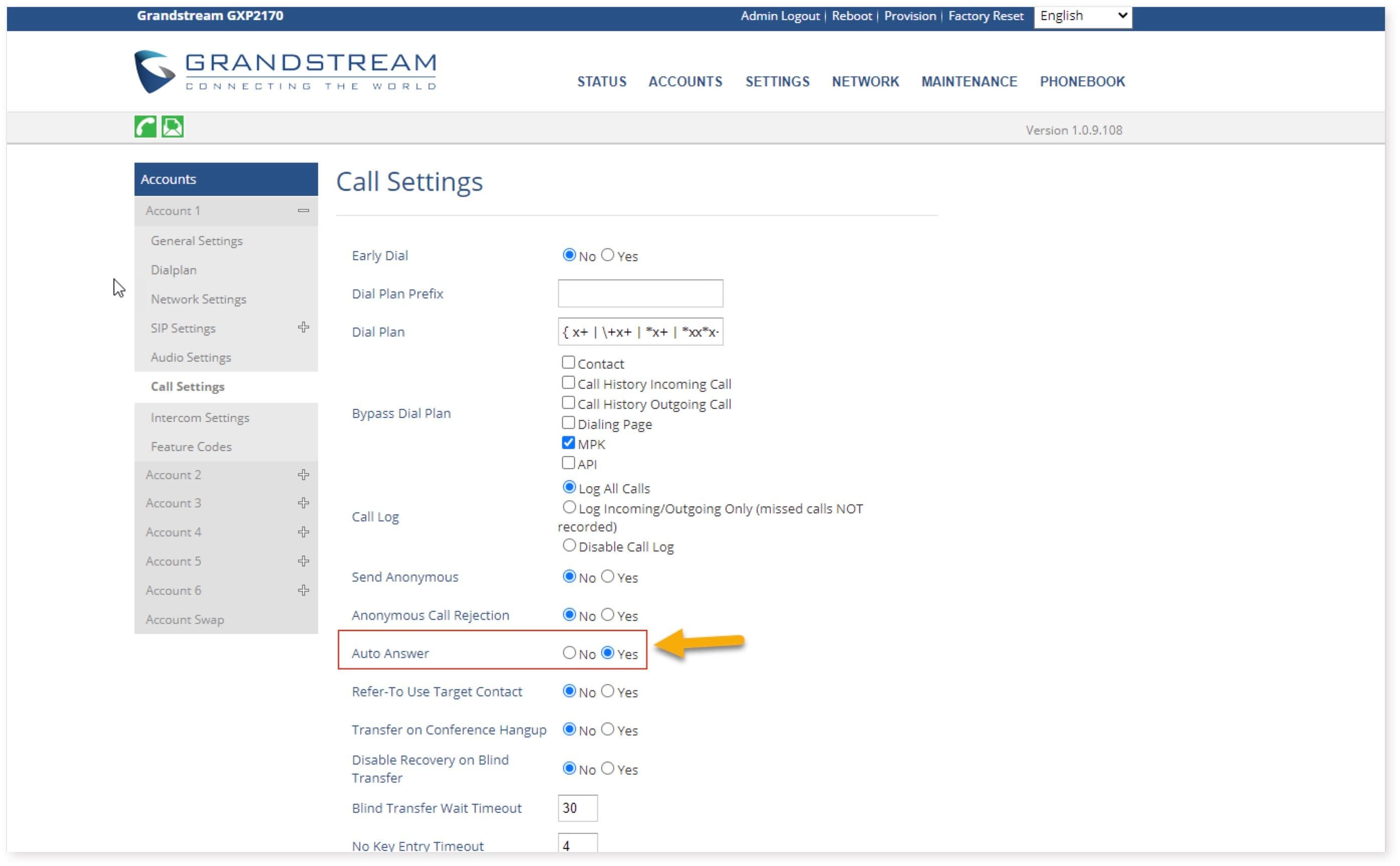
-
SIP Account Setup:
- Configure the SIP account on the phone as you would for a normal SIP extension.
-
Enable Auto Answer:
-
Turn on the "Auto Answer" feature for the SIP account.
-
Example: On Grandstream phones, access Call Settings for the specific SIP account (e.g., Accounts > Account 1 > Call Settings).
-
Enable "Auto Answer" and save settings.
-
Selective Intercom Calling:
-
Create Multiple SIP Extensions:
- Create two SIP extensions on the phone (e.g., 4000 for normal calls and 4100 for intercom calls).
-
Configure SIP Accounts:
-
For the intercom extension (e.g., 4100), enable Auto Answer.
-
For the normal extension (e.g., 4000), keep Auto Answer off.
-
Usage:
-
Calling the normal extension (e.g., 4000) will ring normally.
-
Calling the intercom extension (e.g., 4100) will activate auto answer and speakerphone.
By following these steps, you can set up an intercom-like functionality using SIP handsets with Evo Voice.